ExoPanda Scrooms Macro
The free Scrooms auto catch macro, and exactly how to set it up to AFK farm Scrooms in Roblox
Download ExoPanda from exopanda.com/downloads, open Apps and install ExoPanda Scrooms, then get a free key (watch a short ad) and paste it into the hub. In Roblox, put your instrument in hotbar slot 1, keep Roblox in front, and press F3. The macro equips your instrument and catches Scrooms on its own.
Scrooms is a brand-new Roblox adventure where you tame dancing mushroom creatures by playing them a tune. Every catch is a little rhythm minigame: start a song, hit the ring, tune the needle, then keep the Scroom inside the catch zone until the bar fills. It's fun the first hundred times, and a grind after that, especially when you're trying to finish the Scroomdex or farm chimes.
The ExoPanda Scrooms macro plays that minigame for you. It's free, it lives in the same ExoPanda hub as the ExoPanda Fisch macro, and once it's set up you just press F3 and walk away. This guide covers every step, from download to your first AFK catch.
What the Scrooms macro does
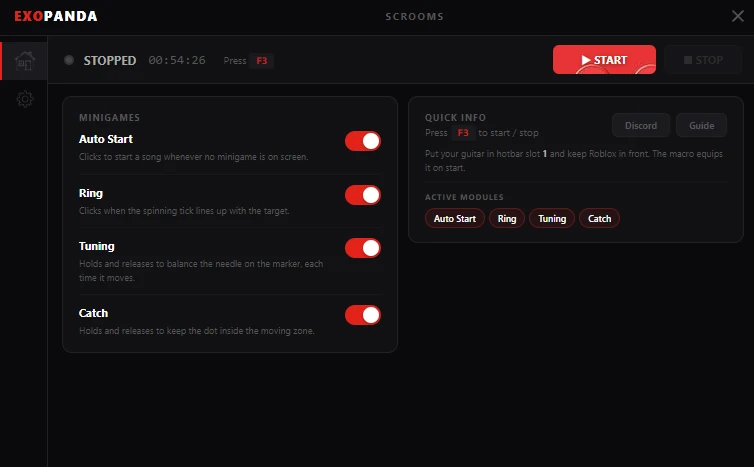
The Scrooms catching minigame has four parts, and the macro has a module for each. Every module has its own toggle, so you can let the macro play all of it or just the parts you find tedious.
Clicks to start a song whenever no minigame is on screen, so a new catch begins as soon as the last one ends.
Clicks when the spinning tick lines up with the target, for the best timing on every catch.
Holds and releases to balance the needle on the marker, each time it moves, so you tune before the Scroom commits.
Holds and releases to keep the dot inside the moving zone until the progress bar fills and the Scroom is yours.
The macro runs outside Roblox and only reads the screen and sends clicks and key presses, the same inputs you'd make yourself. It doesn't inject anything into the game.
Requirements
How to download the Scrooms macro
- Download ExoPandaGet the installer from the official page, exopanda.com/downloads. ExoPanda's Scrooms macro page also links straight to it, along with a VirusTotal scan.
- Run the setup installerIf ExoPanda is already open, the installer closes it and updates it. Finish the install and let it launch.
- Install ExoPanda ScroomsIn the hub, open Apps, find Scrooms and click Install.
How to get your free ExoPanda key
The Scrooms macro is completely free, but it needs a runtime key from ExoPanda. Keys don't cost anything, you just watch a short ad:
- Open the key pageFrom the hub's home page, click the runtime key option, or go to exopanda.com/getkey.
- Watch the adWatch the short ad, then close it.
- Generate a new keyScroll to the bottom and click Generate new key. You'll watch one more short ad.
- Copy and paste itScroll back to the bottom, copy your key, and paste it into the ExoPanda hub.
When your runtime runs low, you can top it up the same way by watching another short ad.
How to set up the macro in Scrooms
- Put your instrument in hotbar slot 1Any instrument works, such as your guitar, lute or violin. The macro equips slot 1 when it starts.
- Go to a catching spotOpen Scrooms in Roblox and walk to wherever you want to catch Scrooms.
- Launch the Scrooms macroIn ExoPanda, click Scrooms and then Launch. Check that all four modules are on: Auto Start, Ring, Tuning and Catch.
- Optional: turn on Always on topIn the macro's settings, turn on Always on top if you want to keep Roblox full screen.
- Keep Roblox in front and press F3Click back into Roblox and press F3. The macro equips your instrument, starts a song and plays every catch on its own. Press F3 again to stop.
Prefer video? The macro part of Cocajola's full Scrooms guide starts at 5:24 and shows the download, the free key and the macro catching Scrooms live. The video above starts there. Cocajola also has a written Scrooms macro download page.
Settings and tips
If the ring click lands a little early or late, adjust the timing sliders in Settings until it lines up.
Want to play part of the catch yourself? Turn that module off and leave the rest on.
Don't click into other windows while it runs. The macro needs Roblox in front.
A higher Tune Speed makes the tuning step quicker, so upgrading instruments speeds the macro up too.
Troubleshooting
| Problem | Fix |
|---|---|
| Nothing happens when I press F3 | Click into Roblox first so it's in front, check your key is active, and check the hotkey under Quick Info in the macro window. |
| It doesn't equip my instrument | Move your instrument to hotbar slot 1. |
| The macro doesn't work at all | In ExoPanda, open Bootstrapper → Integrations and turn on Keep Roblox on live production and Run Roblox through ExoPanda. Then relaunch Roblox through ExoPanda so it's on the right version. |
| The ring sometimes misses | A known occasional bug that's being fixed. The macro keeps playing the rest of the minigame. Fine-tune the timing sliders if it happens a lot. |
| Key expired | Watch a short ad on the key page to top up your runtime. |
| Antivirus warning on install | Download only from exopanda.com. Macros that send input are often flagged; see why macros get flagged. |
Is the Scrooms macro safe?
Yes. ExoPanda is virus-scanned and digitally signed, it runs outside Roblox, and it only sends input the way a player would. Read our full is ExoPanda safe? breakdown for the details.
As for bans: so far there's no rule against macros in Scrooms that we know of. Play on a private server when you can, keep sessions reasonable, take breaks, and keep your setup to yourself, the same common sense as with any Roblox macro. See can you get banned for using Roblox macros?
What to farm with it
An AFK catch loop is perfect for the slow parts of Scrooms: filling the Scroomdex, leveling up (you need level 25 for the speed boots), and farming chimes by selling your catches. Our Scrooms beginner guide covers quests, money, the speed boots and how to reach the Bluestone Caverns.
Scrooms' developers say its progression takes inspiration from Fisch, so if you've used the ExoPanda Fisch macro, everything here will feel familiar.
FAQ
Is there a Scrooms macro?
Yes. The ExoPanda Scrooms macro plays the whole catching minigame for you: it starts a song, hits the ring timing, keeps the tuning needle on the marker and keeps the Scroom inside the catch zone. It's our recommended Scrooms macro.
Is the Scrooms macro free?
Yes. The macro itself is free. You only need a free ExoPanda key, which you get by watching a short ad on the key page. There's no payment and no signup.
What is the Scrooms macro hotkey?
F3 starts and stops the macro by default. You can also press the Start button in the macro window.
Which hotbar slot does my instrument go in?
Slot 1. Put your instrument (for example your guitar) in hotbar slot 1. The macro equips it when it starts.
Why isn't the Scrooms macro working?
Make sure Roblox is in front, your instrument is in slot 1, and your key is active. If it still doesn't work, open ExoPanda's Bootstrapper tab, go to Integrations and turn on Keep Roblox on live production and Run Roblox through ExoPanda, then relaunch Roblox.
The ring click lands early or late. How do I fix it?
Open the macro's Settings and adjust the timing sliders until the ring click lines up. Occasional missed rings are a known bug, and the macro keeps playing the rest of the minigame.
Can I play full screen?
Yes. Turn on Always on top in the macro settings so you can keep Roblox full screen while the macro runs.
Can you get banned for using a Scrooms macro?
There's no rule against macros in Scrooms that we know of, and ExoPanda only sends input from outside Roblox, the way a player would. To be safe, play on a private server when you can, take breaks, and keep your setup to yourself.
Does the Scrooms macro work on Mac or mobile?
Not right now. The Scrooms macro runs on Windows PCs through the ExoPanda hub, even though Scrooms itself is planned for PC, mobile and console.
Is it Scrooms or Shrooms?
The official spelling is Scrooms, but lots of players search for "Shrooms macro" or "Scrims macro". It's the same game.